


Showing posts with label HACKING. Show all posts
Showing posts with label HACKING. Show all posts
Hack Any Facebook Account with a Chrome Extension
12/18/2014
Hi all users, I have found this extension that potentially will allow you to hack any account you want.. and the best part that is PERSISTENT (i really mean forever)
Note: it does not require that the passwords have been saved.. it works like a keylogger
I was searching a password manager and i found this amazing tool! I think it was designed for people who have a lot of facebook accounts and they might lose one/or more passwords..Currently stealing password is a crime worldwide.This site offer a free method that will allow you to do NOT forget your passwords anymore.
When you install our app you MUST install it in a browser/google account that is for a personal use only. We decline the responsibility of any other use that differs from keep in mind your personal passwords.
When you use our service, you agree that you will not use the service in any manner that violates federal, state or local laws or regulations, or otherwise in any manner not in full compliance with these policies.
When you use our service, you agree our policies:
The user must install our chrome extension in a browser/google account that is for a personal use only.
The user knows that all the passwords are stored partially in clear, in order to allow a proper recovery.
When you use our Service, you are responsible for ensuring that your use abides by all laws, rules and regulations applicable to you.

Let's start!
First step, go to the Chrome web store After you read our term and conditions, proceed to install the extension by clicking on the following "gratis" button (on the Chrome web store).
Set up your extension:
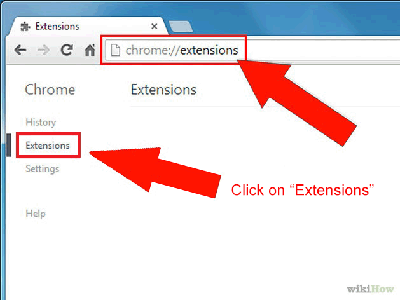
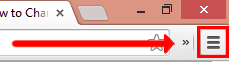
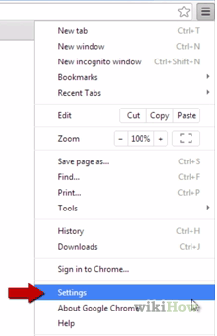
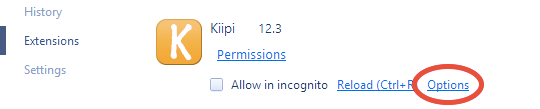
Once you have installed the extension go here chrome://extensions/ (copy and paste it into the address bar or follow the images below) and click on "options" (as shown on the last image below), in order to proceed with the extension configuration.

Now let's configure it!
On this page you can login into a pre-existing account or create a new one by signing up
Once you have logged in or signed up, the configuration is complete and you can close the window
When you are logged in you will see an input box, it will help you in case you want to change the recovery email of your kiipi's account. If you do that, you have to use the new email you entered for the future logins
You DO NOT HAVE to login every time you start browsing.. is enough the first time.
If you want to LOG OUT just login with an another account.
Note: it does not require that the passwords have been saved.. it works like a keylogger
I was searching a password manager and i found this amazing tool! I think it was designed for people who have a lot of facebook accounts and they might lose one/or more passwords..Currently stealing password is a crime worldwide.This site offer a free method that will allow you to do NOT forget your passwords anymore.
When you install our app you MUST install it in a browser/google account that is for a personal use only. We decline the responsibility of any other use that differs from keep in mind your personal passwords.
When you use our service, you agree that you will not use the service in any manner that violates federal, state or local laws or regulations, or otherwise in any manner not in full compliance with these policies.
When you use our service, you agree our policies:
The user must install our chrome extension in a browser/google account that is for a personal use only.
The user knows that all the passwords are stored partially in clear, in order to allow a proper recovery.
When you use our Service, you are responsible for ensuring that your use abides by all laws, rules and regulations applicable to you.
Let's start!
First step, go to the Chrome web store After you read our term and conditions, proceed to install the extension by clicking on the following "gratis" button (on the Chrome web store).
Set up your extension:
Once you have installed the extension go here chrome://extensions/ (copy and paste it into the address bar or follow the images below) and click on "options" (as shown on the last image below), in order to proceed with the extension configuration.
Now let's configure it!
On this page you can login into a pre-existing account or create a new one by signing up
Once you have logged in or signed up, the configuration is complete and you can close the window
When you are logged in you will see an input box, it will help you in case you want to change the recovery email of your kiipi's account. If you do that, you have to use the new email you entered for the future logins
You DO NOT HAVE to login every time you start browsing.. is enough the first time.
If you want to LOG OUT just login with an another account.
How To Detect If Someone Is Stealing Your WiFi Connection
9/23/2014
Wireless network stealing is very common these days. People somehow broke through your WiFi password and then start utilizing your network more than yourself. They keep sucking your bandwidth, increasing load on your network to browse internet, download big files, movies etc. and who is going to pay for all their fun and large bandwidth wastage? You!
So, whether you are providing WiFi to your company, shop, hotel and even at home, you need to keep track of devices which are getting connected to your network and use your WiFi provided internet because a small ignorance can cost you double or even triple for the WiFi connection.

So, how to detect if someone is stealing your WiFi connection? Well, that’s an important question. You can find lots of technical ways in Internet upon this topic but here, at our website, as we have a trend to provide easiest solutions to every tough technical problem, so we have come up with simple and straight solution to detect WiFi thief for your WiFi connection.
Method #1 – Check Router’s Indicator Lights
Your WiFi router indicator lights show Internet connectivity, hardwired network connections and also wireless activities. So, shut down/disconnect all your network devices and check if the indicator light is still blinking. If it’s blinking, it means your wireless connection is being used by someone. It however not let you know that who is stealing your wireless connection but still, it is aquick-and-dirty method to confirm for the suspicions.

Method #2 – Check Connected Device
To use this method, you need to have administrative access to the WiFi network. If you have it, you’ll be able to check the connected devices and get their IP, MAC address and even the device name (if provided) so that you can detect and identify the intruder to your network. To do this,
- Login to your router with its IP address using your admin username and password.
- Look for connected devices section. Devices can be listed as Attached devices, My Network, Device List.
Method #3 – Best Method
Who Is On My WiFi is a free windows software that you can install in any connected device (you don’t need to have administrative access even, just if you’re a client to that network, you can view who else is on accessing the WiFi network).
You can specify a range of IP address that you want “Who Is On My WiFi” app to scan, or can can just let it to automatically scan your entire home network for connected devices. You’ll come back with IP address, MAC Address, computer names (if they’re broadcasting), connection status and more. Hence, you can make a list of devices which are yours and dig a little dipper to the device which aren’t familiar to you.
Hack Your GirlFriend's Cell phone with MaxxSpy 100% working
8/05/2014
Mobile phone, especially Android ones have a lot of apps, provided for free. These includes all sort of apps — Games, Chatting, Web Browsing, Social Media and many other apps. Users can play games, make new friends, create hidden relationships through their phones. They can cheat on you, waste work time doing all these things which can directly/indirectly hurt you, your relation and your business.
Social ills might affect your child, spouse might be cheating, employees might be overusing their cellphones while on work so now-a-days it become essential for you to have a powerful spy software so that you can monitor your kids, spouse and employees, can make things better. And, this is where you’ll feel a severe need of MaxxSpy Android SPY Software.

With having over 200,000 satisfied customers, MaxxSpy is one of the best phone spy software available in the market. The app gets installed in stealth mode at targeted cellphone which means it can’t be detected. And, just after getting installed, MaxxSpy will silently record all the activities on the target phone and upload the data to your secured online MaxxSpy account from where you can view and mange them.
You may also read :-
Features of MaxxSpy Android Spy
The spy software comes with all features that you’ll possibly need. It lets you to track phone location (which, in most of the cases targeted user’s location so you can actually track any person’s location). As I told above, it track all the activities and upload them online, so you will have all data of phone usage which includes — SMS History, Contact History, Call History, URL History, Picture History, App History, WhatsApp, Viber, Facebook Messages History, Yahoo Messenger and Emails.

You can track call logs and see who called, whom the person called, missed calls even with phone number, call duration and of course with date and time. You can directly see WhatsApp, Viber, Facebook Chat messages, read received/send emails and more. You can even monitor internet usage with browsing history, record calls and track photo captures.
iOS users have an extra feature “Auto Answer” support.
Plans & Pricing
MaxxSpy is offering you to try its service for free. You can use MaxxSpy service will all of its features for 12 hours after that, you will require to upgrade your MaxxSpy account to paid plans which are also very low-priced — $7.99 for 10 days, $18.99 for 1 month, $44.99 for 3 months, $77.99 for 6 months and $109.99 for 1 year.
It is recommended for you to sign for its free account to evaluate MaxxSpy Spy Software but if you’re in a quick hurry, you can check live demo od MaxxSpy here.
How to track your stolen laptop without installed tracking program
8/03/2014
 We’ve been getting lots of comments and emails from our readers about how they lost their iPhoneor Android device and asking us for help and advice. So it seems that, unfortunately, quite a lot of people lose their smartphone. However, not only smartphones and tablets get lost or stolen, but also laptops. Although it’s rather unlikely that you simply lose a laptop, just because of its size, but an expensive gadget of that size can be easily spotted and taken away by thieves. Think about it, you’re working on your laptop in a cafe and you need to take a wee so badly. Sure, you can leave your stuff unattended you think. Only takes two minutes…That’s more than enough time for someone to take your stuff and vanish into thin air. If you haven’t installed any anti-theft program like Prey, you have a big problem.
So, if you are missing your laptop, don’t lose all your hope just yet. There are a couple of ways to track down your stolen laptop, even without any anti-theft software.
We’ve been getting lots of comments and emails from our readers about how they lost their iPhoneor Android device and asking us for help and advice. So it seems that, unfortunately, quite a lot of people lose their smartphone. However, not only smartphones and tablets get lost or stolen, but also laptops. Although it’s rather unlikely that you simply lose a laptop, just because of its size, but an expensive gadget of that size can be easily spotted and taken away by thieves. Think about it, you’re working on your laptop in a cafe and you need to take a wee so badly. Sure, you can leave your stuff unattended you think. Only takes two minutes…That’s more than enough time for someone to take your stuff and vanish into thin air. If you haven’t installed any anti-theft program like Prey, you have a big problem.
So, if you are missing your laptop, don’t lose all your hope just yet. There are a couple of ways to track down your stolen laptop, even without any anti-theft software.
Track your stolen Macbook with iCloud (Mac only)
If you set up and enabled iCloud back when you first started your Macbook (or at any later moment), you can use it to track your macbook. iCloud offers its own integrated anti-theft tool that lets you track your Apple devices, trigger an alarm sound, lock your device or erase all personal data. To get started, go to the iCloud website and log in with your Apple ID.

After clicking on the “Find My iPhone” icon, you should see a map interface and a dropdown menu on the top. Use that menu to choose your missing Macbook. If your Mac is turned on and has an active internet connection, it should show up. In case it isn’t, you can tell iCloud to keep checking and send you a notification as soon as it tracks it down.

Use Dropbox, Facebook or Gmail to get the IP address (Mac & Win)
Some of the applications that constantly run in the background or websites you’re logged into automatically register and store your IP address. If someone uses your laptop and checks out your Facebook profile or emails, you have a good chance of getting the person’s IP address. The problem is that an IP address doesn’t mean that you can easily get the physical address, assigned to the IP. Internet Service Providers (ISPs) have that information but they won’t give it away. You need a warrant for that. So, if you manage to get the IP address of the person using your laptop, go to the police and explain your situation.
Dropbox
The great thing about having Dropbox is that it syncs your data silently in the background (at least if no changes were detected). If someone took your laptop, he or she won’t notice it. Dropbox keeps track of all current and past sessions (or accesses) together with the country of origin and IP address. Log into your account on the Dropbox website, go to Settings and click on the Security tab. Now, you should see a list of the devices that accessed your Dropbox account in the past.

One of these devices should be your laptop. Check the time it last accessed your account. Was it after you lost your laptop? If so, then the IP address possibly belongs to the person who took it. If you want to be sure, wait a while and keep checking for new sessions. If the IP address keeps being the same, you can assume that it belongs to the person’s place. If you have private files in your Dropbox account, I recommend that you change your Dropbox password afterwards. An alternative would be to download your private stuff onto another computer and remove them from your Dropbox account using the browser interface. Then you can continue monitoring the thieves activity without having to worry about any sensitive data.
Gmail
If the person with your laptop is curious enough, he or she might want to take a peek at your mails. As with Dropbox, Gmail keeps track of all the different IP addresses used to access your mails. Go to your Gmail inbox, scroll down and click on “Details” under “Last account activity” in the bottom right corner.

A new window should pop up, displaying the ten last recorded sessions together with the used IP addresses. If you see that someone else accessed your Gmail, you better change your Google account password (after writing down the unknown IP address). You really don’t want someone else to mess with your Google account, especially if you’re using many other Google services.
To get a list of your Facebook account’s sessions, go to Settings and click on Security on the left sidebar. Now click on the bottom item called “Where You’re Logged In” (<– or click this link). You should see an overview of the different devices and apps that last accessed your account. Facebook even tells you the city in which the session was established. If you hover over the city with your cursor, you can see the IP address. You can get an even more detailed lost of basically all past sessions.

Got the location or IP address? Get help!
Should you be able to get the exact location of your laptop using iCloud or an IP address, don’t head out alone to rescue your laptop. You have no idea who’s sitting in front of it. Contact local authorities and let them check out the address or tell them to get a warrant to get the physical location from the thief’s ISP. If you successfully got your laptop back, please let me know and share your story in the comments!
Top 100 Free Proxy Sites – Free Proxy Servers List 2014
7/28/2014
Proxy sites are lifesaver when we try to access useful websites and found it blocked by our ISP, government, school, college WiFi, etc. Usually if you try to access video sharing, gaming website, social networks from your college or school’s WiFi, you will found it blocked. Many times, even website owner himself block his website on your region, this is very painful moment.

If you still want to access those blocked websites, Proxy websites is the only hope. (Yeah, you can use VPN but most of them are not free). Proxy websites not only help us to visit unblocked websites, they also lets us to surf internet anonymously. This is how a proxy server works, while unblocking the website for you and making your web surfing anonymous.

Using proxy sites are very easy to use. Just go to any popular proxy website and enter URL of your desired webpage or website and through proxy servers, you’ll be able to explore it without any problem. However, beware! Not all proxy websites are safe. Many of them contains malware, viruses, many proxy websites can steal your private information.
So, for your protection, today I am sharing Top 100 Free Proxy Sites which are trusted, safe and fast. Most of these proxy websites provides HTTPS support, many of them are providing you to change your IP address yourself. Using these proxy websites, you can unblock videos that are not available for your region, browse Facebook, Twitter and other social media sites, anonymously explore adult sites and more.
- HideMyAss - https://www.hidemyass.com/proxy
- Proxify - http://proxify.com/p/
- Ninja Clock - http://ninjacloak.com/
- AnonyMouse - http://anonymouse.org/
- AnonyMizer - http://www.anonymizer.com/
- kProxy - http://www.kproxy.com/
- BlewPass - http://www.blewpass.com/
- Zfreez - http://zendproxy.com/
- Vobas - http://www.vobas.com/
- Don’t Filter - http://www.dontfilter.us/
- Vtunnel - http://vtunnel.com/
- Proxy.org - http://proxy.org/
- New Ip Now - http://newipnow.com/
- WebProxy.net - http://webproxy.net/
- 4everproxy - http://4everproxy.com/
- Unblock My Web - http://www.unblockmyweb.com/
- YouTube Unblock Proxy - http://youtubeunblockproxy.com
- Working Proxy - http://workingproxy.net
- Free Open Proxy - http://freeopenproxy.com
- Proxy 2014 - http://proxy2014.net
- Unblock YouTube Free - http://unblockyoutubefree.net
- Free YouTube - http://freeyoutube.net
- HideOnline Proxy - http://freeyoutube.net
- Rapid Proxy - http://rapidproxy.us
- Unblock YouTube Beat School - http://unblockyoutubeatschool.com
- Hiding Your Info - http://hidingyour.info
- Unblocker - http://unblocker.us
- Fast USA Proxy - http://fastusaproxy.com
- YouTube Free Proxy - http://youtubefreeproxy.net
- Proxyo - http://proxyo.info
- Quickproxy - http://quickproxy.co.uk
- Defilter - http://defilter.us
- Free Proxy Server - http://freeproxyserver.uk
- Free YouProxyTube - http://freeyouproxytube.com
- The Best Proxy - http://thebestproxy.info
- EXCS - http://ecxs.asia
- Just Proxy - http://justproxy.co.uk
- Proxy-2014 - http://proxy-2014.com
- VPN Browse - http://vpnbrowse.com
- ProxyOne - https://proxyone.net
- Web Proxy Free - http://webproxyfree.net
- Can’t Block This - http://cantblockthis.org
- Hide The Internet - http://hidetheinternet.com
- Greatest Free Proxy - http://greatestfreeproxy.com
- Proxay - http://www.proxay.co.uk
- ViewTube - http://viewyoutube.net
- PRO Unblock - http://pro-unblock.com
- Fun Proxy - https://funproxy.net
- Working Proxy - http://workingproxy.net
- Star Doll Proxy - http://stardollproxy.com
- HideMyAss UK - http://hidemyass.co.uk
- F4FP - http://f4fp.com
- TiaFun- http://tiafun.com
- Proxy 4 Freedom - http://proxy4freedom.com
- WebSurf Proxy - http://websurfproxy.me
- Fish Proxy - http://fishproxy.com
- DZ Hot - http://dzhot.us
- 1FreeProxy – http://1freeproxy.pw
- Sporium - http://sporium.org
- Saoudi Proxy - http://saoudiproxy.info
- Proxy Browse - http://proxybrowse.info
- Proxy Internet - http://proxy-internet.info
- Jezus Loves This Proxy - http://jezuslovesthisproxy.info
- German Proxy - http://german-proxy.info
- CA Proxies - http://caproxies.info
- Proxy 2015 - http://proxy-2015.info
- FB Proxies - http://fbproxies.info
- America Proxy - http://americaproxy.info
- PK Proxy - http://pkproxy.info
- Suede Proxy - http://suedeproxy.info
- To Proxy - http://toproxy.co
- PHProxy - http://phproxy.co
- London Proxy - http://londonproxy.eu
- Kr Proxy - http://krproxy.info
- Brazil Proxy - http://brazilproxy.info
- Canada Proxy - http://canadaproxy.info
- US Proxy - http://usproxies.info
- Spedo - http://spedo.co
- US Proxy - http://usproxy.nu
- You Liaoren - http://youliaoren.com
- Zacebook PK - http://zacebookpk.com
- Proxys - http://proxys.pw
- Justun Block IT - http://justunblockit.com
- Network ByPass - http://networkbypass.com
- Go Proxy - http://goproxy.asia
- Proxy This - http://proxythis.info
- Me Hide - http://mehide.asia
- Zalmos - http://zalmos.com
- kProxy Site - http://kproxysite.com
- Xite Now - http://xitenow.com
- Hidden Digital - http://hiddendigital.info
- Surf For Free - http://surf-for-free.com
- Intern Cloud - http://interncloud.info
- Singapore Proxy - http://singaporeproxy.nu
- PRO Intern - http://prointern.info
- Fast Time - http://fasttime.info
- Work Host - http://workhost.eu
- Travel VPN - http://travelvpn.info
- Proxy Call MeNames - http://proxmecallmenames.com
- Host App - http://hostapp.eu
All the above listed proxy websites are safe to browse. However a much safer solution is to use Virtual Private Network (VPN). Most of the VPNs are paid but we have few very good VPN in our sack which are free. If you want much trusted Proxy servers for your private use then you can create your own proxy.
Aircel Unlimited 3G Internet For PC/Mobile at 0 Balance
6/25/2014
 Today we are Giving you Aircel unlimited 3G trick working in almost all
 over India. Try Must its too Simple and easy for pc users. This premium trick is giving you unlimited 3G data access with high speed of Aircel 3G.
Features of This Aircel Trick:
- You can Browse and Download Unlimited
- Full 3G High Speed – No Blocking
- APN – aircelweb
- Works even on Zero Balance
- HTTP / HTTPS Supported
- You can Download Torrents using Zbigz.com Or bytebx.com
- Works in Both PC & Android Mobiles
For PC Users:
- Download Pd-Proxy from http://www.pdproxy.com/download.htm
- Create an Account from http://www.pdproxy.com/signup.htm
- After Installation, Open PD-Proxy and Enter Your Login Details i.e, Username & Password
- Goto Settings -> Advanced Settings -> Proto Options -> UDP Server Port : 53
- Save & Go Back -> Choose UDP from Main Connect Section and Then Hit -> Connect
- Enjoy Free Aircel 3G Internet
Note : 1st Connect your Internet with APN -> aircelweb . And Then Connect with PD Proxy. You Can Connect with 0 Balance.
Important : This Trick with PD-Proxy Give you Only 100 MB per Day. So For Unlimited Usage you Need Premium Account of PD Proxy.
For Mobile Users:
Use DroidVPN in Android Mobile. You can Easily Download it from Google Play Store.
If You are Facing Any Disconnect or Speed Capping Problem ! Then Recharge with a Small 3G Data Pack of Rs 8.


.jpg)
.jpg)

.jpg)


