Number Pattern Programs in C
7/03/2012
Learn Number pattern program in C and generates new logics and new concept which is better for your FUture. Learn and Enjoy the new Patterns of number in C.

you can also read this :-
How To Play Sounds In C Language
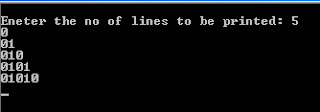
Number pattern :1
#include<conio.h>
#include<stdio.h>
void main()
{
int i,j,n;
clrscr();
printf("\nEneter the no of lines to be printed: ");
scanf("%d",&n);
for(i=0;i<n;i++)
{
for(j=0;j<=i;j++)
{
if(j%2==0)
printf("0");
else
printf("1");
}
printf("\n");
}
getch();
}
Number pattern :2

#include<conio.h>
#include<stdio.h>
void main()
{
int i,j,n,k;
clrscr();
printf("\nEnter the no of lines to be printed: ");
scanf("%d",&n);
for(i=0;i<n;i++)
{
for(j=n-i;j>0;j--)
{
printf(" "); //THIS IS THE CODE FOR PRINTING THE SPACES.
}
for(k=0;k<=i;k++)
{
if(k%2==0)
printf("0");
else
printf("1");
}
printf("\n");
}
getch();
}
Number pattern :3
#include<conio.h>
#include<stdio.h>
void main()
{
int i,j,n;
clrscr();
printf("Enter the number of lines to be printed: ");
scanf("%d",&n);
printf("\n\n");
for(i=1;i<=n;i++)
{
for(j=1;j<=i;j++)
{
printf("%d",j);
}
printf("\n");
}
getch();
}
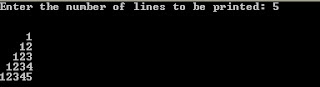
Number pattern :4
#include<conio.h>
#include<stdio.h>
void main()
{
int i,j,n,k;
clrscr();
printf("Enter the number of lines to be printed: ");
scanf("%d",&n);
printf("\n\n");
for(i=1;i<=n;i++)
{
for(j=1;j<=n-i;j++)
{
printf(" ");
}
for(k=1;k<=i;k++)
{
printf("%d",k);
}
printf("\n");
}
getch();
}
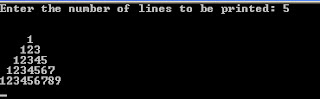
Number pattern: 5
#include<conio.h>
#include<stdio.h>
void main()
{
int i,j,n,k;
clrscr();
printf("Enter the number of lines to be printed: ");
scanf("%d",&n);
printf("\n\n");
for(i=0;i<n;i++)
{
for(j=0;j<(n-i-1);j++)
{
printf(" ");
}
for(k=1;k<=2*i+1;k++)
{
printf("%d",k);
}
printf("\n");
}
getch();
}
Number pattern:6
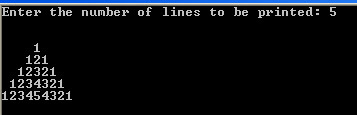
#include<conio.h>
#include<stdio.h>
void main()
{
int i,j,n,k;
clrscr();
printf("Enter the number of lines to be printed: ");
scanf("%d",&n);
printf("\n\n");
for(i=0;i<n;i++)
{
for(j=0;j<(n-i-1);j++)
{
printf(" ");
}
for(k=1;k<=i;k++)
{
printf("%d",k);
}
while(k>0)
{
printf("%d",k);
k--;
}
printf("\n");
}
getch();
}
Number pattern:7
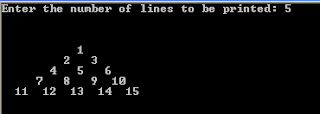
#include<conio.h>
#include<stdio.h>
void main()
{
int i,j,n,k,num=1;
clrscr();
printf("Enter the number of lines to be printed: ");
scanf("%d",&n);
printf("\n\n");
for(i=0;i<=n;i++)
{
for(j=0;j<(n-i);j++)
{
printf(" ");
}
for(k=1;k<=i;k++)
{
printf("%4d",num++);
}
printf("\n");
}
getch();
}
Number pattern: 8

#include<conio.h>
#include<stdio.h>
void main()
{
int i,j,n,k=1;
clrscr();
printf("Enter the number of lines to be printed: ");
scanf("%d",&n);
printf("\n\n"); for(i=0;i<n;i++)
{
for(j=0;j<=i;j++)
{
if(k%2==1)
printf("1");
else
printf("0");
k++;
}
printf("\n");
}
getch();
}
Number pattern 9
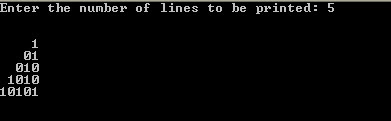
#include<conio.h>
#include<stdio.h>
void main()
{
int i,j,n,k=1,l;
clrscr();
printf("Enter the number of lines to be printed: "); scanf("%d",&n);
printf("\n\n");
for(i=0;i<n;i++)
{
for(l=n;l>i+1;l--)
printf(" ");
for(j=0;j<=i;j++)
{
if(k%2==1)
printf("1");
else
printf("0");
k++;
}
printf("\n");
}
getch();
}
Number pattern :10

#include<conio.h>
#include<stdio.h>
void main()
{
int i,j,n,k=1;
clrscr();
printf("Enter the number of lines to be printed: ");
scanf("%d",&n);
printf("\n\n");
for(i=n;i>0;i--)
{
for(j=0;j<n-i;j++)
{
printf(" ");
}
for(k=i;k>0;k--)
{
printf("%d",k);
}
printf("\n");
}
getch();
}
Number pattern :11

#include<conio.h>
#include<stdio.h>
void main()
{
int i,j,n;
clrscr();
printf("Enter the number of lines to be printed: ");
scanf("%d",&n);
printf("\n\n");
for(i=1;i<=n;i++)
{
for(j=i;j>0;j--)
{
printf("%d ",j);
}
printf("\n");
}
getch();
}
Number pattern 12

#include<conio.h>
#include<stdio.h>
void main()
{
int i,j,k,n,l;
clrscr();
printf("\nEnter the no lines to be printed: ");
scanf("%d",&n);
printf("\n\n");
for(i=0;i<n;i++)
{
for(j=n-i;j>0;j--)
printf(" ");
for(k=i;k>0;k--)
{
printf("%d ",k);
}
for(l=2;l<=i;l++)
{
printf("%d ",l);
}
printf("\n");
}
}
Number pattern :13
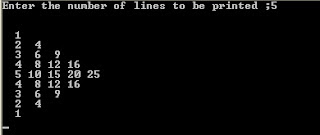
#include<conio.h>
#include<stdio.h>
void main()
{
int i,j,k,n;
clrscr();
printf("Enter the number of lines to be printed ;");
scanf("%d",&n);
printf("\n\n");
for(i=1;i<=n;i++)
{
for(j=1;j<=i;j++)
{
printf("%3d",(j*i));
}
printf("\n");
}
for(k=n-1;k>0;k--)
{
for(j=1;j<=k;j++)
printf("%3d",(k*j));
printf("\n");
}
getch();
}
Number pattern 14
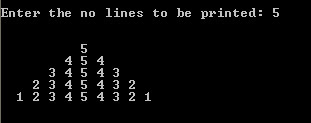
#include<conio.h>
#include<stdio.h>
void main()
{
int i,j,k,n,l;
clrscr();
printf("\nEnter the no lines to be printed: ");
scanf("%d",&n);
printf("\n\n");
for(i=0;i<n;i++)
{
for(j=n-i;j>0;j--)
printf(" ");
for(k=n-i;k<=n;k++)
{
printf("%d ",k);
}
for(l=n-1;l>=n-i;l--)
{
printf("%d ",l);
}
printf("\n");
}
}
IF any Problem then write in comment !
History About Google Logo Design
7/03/2012

Google was co-founded by Larry Page and Sergey Brin while they were students at Stanford University, and the company was first incorporated as a privately held company on September 7, 1998


Google
is a play on the word googol, a mathematical term for the number
represented by the numeral 1 followed by 100 zeros. The use of the term
reflects Google’s mission to organize a seemingly infinite amount of
information on the web.
Google Homepage on December 2 1998

Google Homepage on April 23 1999

Google Homepage on february 29 2000

Google Homepage on December 3 2000

Google Homepage on October 17 2001

Google Homepage on July 4 2002

Google Homepage on December 4 2002

Google Homepage on December 23 2003

Google Homepage on July 20 2004

Google Homepage on December 20 2005

TRICK TO MAKE SIMPLE CD COVER WITH PAPER
7/03/2012
Fretting over your dust laden CDs and DVDs lying naked on the table??
Don’t shed tears if that’s the scenario, every other household is a
victim of such a mess and the reason is-no covers to protect your CDs
and DVDs!

Hence, we have made an effort to provide you the steps to create your very own CD cover with a paper without any glue, scissors etc.
1> Take a rectangular sheet of paper and place a CD on the width side, with half the CD on the table and half on the paper.
2> Fold both the sides of the paper equally onto the CD as shown in pic 02.

3> Now fold the CD onto the paper as shown in pic 03.
4> Following pic 04, fold the left over portion of the paper onto the CD.
5> Now looking at pics 05 and 06, make 2 rectangular folds on the 2 corners of the paper.
6> Now stuff in the upper portion of the paper in the lower pocket created(pic 07) and Voila!
These 6 easy yet effective steps would certainly help you create your very own CD/DVD cover. So start right away and defend your CDs against dust, scratches and the evil eye .
Hence, we have made an effort to provide you the steps to create your very own CD cover with a paper without any glue, scissors etc.
STEPS TO MAKE A CD COVER:-
1> Take a rectangular sheet of paper and place a CD on the width side, with half the CD on the table and half on the paper.
2> Fold both the sides of the paper equally onto the CD as shown in pic 02.
3> Now fold the CD onto the paper as shown in pic 03.
4> Following pic 04, fold the left over portion of the paper onto the CD.
5> Now looking at pics 05 and 06, make 2 rectangular folds on the 2 corners of the paper.
6> Now stuff in the upper portion of the paper in the lower pocket created(pic 07) and Voila!
These 6 easy yet effective steps would certainly help you create your very own CD/DVD cover. So start right away and defend your CDs against dust, scratches and the evil eye
.Simple programs to print star pattern in c
6/30/2012
Here there are some examples of Star pattern programs in c
Print the stars
You can also read this :-
Number Pattern Programs in C
How To Play Sounds In C Language
pattern1 : Print the stars

#include<conio.h>
#include<stdio.h>
void main()
{
int i,j,n;
clrscr();
printf("\nEneter the no of lines to be printed: ");
scanf("%d",&n);
for(i=0;i<n;i++)
{
for(j=0;j<=i;j++)
{
printf("*");
}
printf("\n");
}
getch();
}
Star pattern 2

#include<conio.h>
#include<stdio.h>
void main()
{
int i,j,n;
clrscr();
printf("\nEneter the no of lines to be printed: ");
scanf("%d",&n);
for(i=0;i<n;i++)
{
for(j=n-i;j>1;j--)
{
printf(" ");
}
for(j=0;j<=i;j++)
{
printf("*");
}
printf("\n");
}
getch();
}
Star pattern 3

#include<conio.h>
#include<stdio.h>
void main()
{
int i,j,n,k;
clrscr();
printf("\nEnter the no of lines to be printed: ");
scanf("%d",&n);
for(i=0;i<n;i++)
{
for(j=0;j<n-i;j++)
{
printf("*");
}
for(k=0;k<(2*n-2*j);k++)
{
printf(" "); //for spaces
}
for(j=0;j<n-i;j++)
{
printf("*");
}
printf("\n");
}
getch();
}
Star pattern 4

#include<conio.h>
#include<stdio.h>
void main()
{
int i,j,n,k;
clrscr();
printf("\nEnter the no of lines to be printed: ");
scanf("%d",&n);
printf("\n\n");
for(i=0;i<n;i++)
{
for(j=0;j<n-i;j++)
{
printf("*");
}
for(k=0;k<(2*n-2*j);k++)
{
printf(" ");
}
for(j=0;j<n-i;j++)
{
printf("*");
}
printf("\n");
}
for(i=0;i<n;i++)
{
for(j=0;j<=i;j++)
{
printf("*");
}
for(k=2*n-2*j;k>0;k--)
{
printf(" ");
}
for(j=0;j<=i;j++)
{
printf("*");
}
printf("\n");
}
getch();
}
Star pattern 5

#include<conio.h>
#include<stdio.h>
void main()
{
int i,j,k,n;
clrscr();
printf("\nEnter the no lines to be printed: ");
scanf("%d",&n);
printf("\n\n");
for(i=0;i<n;i++)
{
for(j=0;j<(n-i-1);j++)
printf(" ");
for(k=0;k<(2*i+1);k++)
printf("*");
printf("\n");
}
for(i=0;i<n-1;i++)
{
for(j=0;j<=i;j++)
printf(" ");
for(k=(2*n-2*i-3);k>0;k--)
printf("*");
printf("\n");
}
}
Star pattern :6 [Diamond pattern]

#include<conio.h>
#include<stdio.h>
void main()
{
int i,j,k,n;
clrscr();
printf("Enter the number of lines to be printed");
scanf("%d",&n);
for(i=0;i<n;i++)
{
for(j=n-i-1;j>0;j--)
printf(" ");
printf("*");
for(k=2*i-1;k>0;k--)
printf(" "); //code for upper triangle
if(i!=0)
printf("*");
printf("\n");
}
for(i=n-1;i>0;i--)
{
for(j=0;j<n-i;j++)
printf(" ");
printf("*"); //code for lower triangle
for(k=2*i-3;k>0;k--)
printf(" ");
if(i!=1)
printf("*");
printf("\n");
}
getch();
}
pattern 7:program for simple star pyramid
 |
| simple star pyramid |
#include<conio.h>
#include<stdio.h>
void main()
{
int i,j,k,n;
//clrscr();
printf("Enter the number of lines to be ptinted");
scanf("%d",&n);
for(i=0;i<n;i++)
{
for(j=i;j<n;j++)
{
printf(" "); // spaces
}
for(k=0;k<2*i-1;k++)
{
printf("*"); // star
}
printf("\n");
}
}
pattern 8:program for simple star pyramid in reverse order
 |
| star pyramid reverse |
#include<conio.h>
#include<stdio.h>
void main()
{
int i,j,k,n;
//clrscr();
printf("Enter the number of lines to be ptinted");
scanf("%d",&n);
for(i=0;i<n;i++)
{
for(j=0;j<i;j++)
{
printf(" ");
}
for(k=2*(n-i)+1;k>1 ;k--)
{
printf("*");
}
printf("\n");
}
}
The program below is good program can be asked for coding compititions
pattern 9: program for arrow pattern
 |
| arrow pattern |
#include<conio.h>
#include<stdio.h>
void main()
{
int i,j,k,n;
clrscr();
printf("Enter the number of lines to be ptinted");
scanf("%d",&n);
for(i=0;i<n;i++)
{
for(j=0;j<i;j++)
{
printf(" ");
}
for(k=0;k<i;k++)
{
printf("*");
}
printf("\n");
} for(i=0;i<n;i++)
{
for(j=0;j<n-i;j++)
{
printf(" ");
}
for(k=0;k<n-i;k++)
{
printf("*");
}
printf("\n");
}
}
pattern 10: Not that Simple program to print hollow pattern triangle.

#include<conio.h>
#include<stdio.h>
void main()
{
int i,j,k,n;
clrscr();
printf("Enter the number of lines to be printed:");
scanf("%d",&n);
printf("\n");
for(i=1;i<2*(n-2);i++)
printf(" ");
printf("*\n");
for(i=1;i<n-1;i++)
{
for(j=n-i;j>0;j--)
printf(" ");
printf("*");
for(k=0;k<2*i-1;k++)
printf(" ");
printf("*\n");
}
printf(" ");
for(i=0;i<2*n-1;i++)
printf("*");
}
pattern 11: Simple Square pattern program in c

#include<conio.h>
#include<stdio.h>
void main()
{
int i,j,k,n;
clrscr();
printf("Enter the number of lines to be printed:");
scanf("%d",&n);
for(i=0;i<n;i++)
printf("*");
printf("\n");
for(i=0;i<n-2;i++)
{
printf("*");
for(j=0;j<n-2;j++)
printf(" ");
printf("*\n");
}
for(i=0;i<n;i++)
printf("*");
}
3 Ticks to run Turbo C++ in Windows 7 in full Screen [Updated]
6/30/2012
First of all, DOwnload Tc for c Language [link updated]
When you try to run turbo c++ IDE on latest version of windows like Windows7 or Vista, you may get the error message that 'The system does not support full screen mode. Choose close to terminate the application.'
Anyway if you are up with turbo
c++ and used to it, I have 3 tricks to run it full screen on windows7
and vista. The tricks can be simply classified based on which works on
all versions of windows7 and one which only works under Windows 7
Enterprise, Windows 7 Professional, and Windows 7 Ultimate.
Technique 1
Log on to windows7 in safe mode.
In safe mode the application running capabilities of an operating
system is low and this mode is used as trouble fixing for OS. But this
method is much simpler and you only need to log on to safe mode by
pressing F8 on start up.
By summarizing the steps:
- Install turbo C++
- Start windows7 in safe mode.
- Execute turbo C++
Technique 2
By Disabling your graphics adapter. This trick is done by just uninstalling the graphics driver. To do that
- Right click on My Computer, click Properties
- Select Device manager->Display Adapters
- Identify the display adapter of your computer, and uninstall.
You should try this trick only if
you do not use your computer for Graphic related operations like
playing multimedia games.By this trick graphics would look vulgar but
you can run C++ in full screen.
Technique 3
By using DOSBox software. It is an
open source DOS emulator for BeOS, Linux, Mac OS X, OS/2, and Windows.
This tool is primarily intended to play DOS games on windows7 but here
we can use it run turbo C++ in Full screen mode.
- Download DOSBox frome here. (for windows)
- Install and run the DOSBox.
- Now a command prompt type window will appear. We need to mount TC folder.
Just type “mount c: c:/tc” and press enter.
- Assumed that Turbo C++ is installed in C drive and TC folders located at C:\TC
- You may get a message that 'Drive C is mounted as local directory C:/TC\'
- Change the directory to C/BIN/tc.exe. To do that, please follow the steps as shown in the below screen shot.

Now the Turbo C++ will open in DOSBox. Press ALT+ENTER to toggle between full screen and mini screen.

By applying the above 3 tricks, you can run C compiler on full screen mode in windows 7.