


Get Gmail Mail Alerts on your Mobile by SMS FREE
5/31/2012
- First Sign up an account with way2sms.com
- After SignUp you will get a confirmation code on the Mobile to Prove your Authentication,If you verify the code your account will be activated.
- Login to your account in way2sms.com

- After that Go to Mail Alerts Section,which is just located besides,see the bellow image.

then you will see this window.........
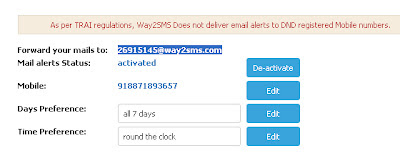
copy the highlighted text ...
- Logon to your Gmail account
- click on settings & then click on 'FORWARDING/POP/IMAP' option
- Select 'Forward a copy of incoming mail to" option & Enter your Way2SMS Email ID 26915145@way2sms.com there.

- Gmail sends a verification code to 26915145@way2sms.com.
- You will receive gmail confirmation mail alert on your mobile with subject line containing confirmation code.
- Copy and paste the verification code in Gmail verification box.Click On Verfy.
- Finished. You will now receive alerts for every incoming mail that arrives in your gmail id.

How to Bypass "ANY" Windows Login Password ?
5/31/2012

Hi all users many of asked us "How to Bypass my Windows 7 Home Premium x64 Password", means they only want to bypass their password no to break it, and we promised them that one day we will surely come with a very easy to use tutorial so here we are, using this hack you can bypass not only "Windows 7 Home Premium x64" password but you can bypass "ANY", yes you heard right! you can bypass any windows password regardless whether they are x32 or 64x. It's really so easy so that every one can become a windows password bypasser lol. So lets get started.
This hack can bypass the following OS's password :
Microsoft Windows XP Home Edition (Service Pack 2+)
Microsoft Windows Vista Home Basic (32/64 bit)
Microsoft Windows Vista Home Premium (32/64 bit)
Microsoft Windows Vista Business (32/64 bit)
Microsoft Windows Vista Enterprise (32/64 bit)
Microsoft Windows 7 Home Premium (32/64 Bit)
Microsoft Windows 7 Professional (32/64 Bit)
Microsoft Windows 7 Ultimate (32/64 Bit)
Microsoft Windows Server 2003 Standard (32/64bit)
Microsoft Windows Server 2003 Datacenter (32/64bit)
Microsoft Windows Server 2003 Enterprise (32/64bit)
Microsoft Windows Server 2003 Web Edition (32/64bit)
Microsoft Windows Server 2008 Standard (32/64bit)
Microsoft Windows Server 2008 Datacenter (32/64bit)
Microsoft Windows Server 2008 Enterprise (32/64bit)
Follow the steps below :
2. Plug-In you USB into your computer and format it to FAT32
.
.

3. Open the download RAR file and extract it and go to the folder named "KonBoot V1.1 32 & 64 bit".
4. Now double click on "KonBootInstall.exe".
5. A command prompt will be prompted and ask you to enter your USB drive latter in my case it is E: enter you USB drive later and press enter. It will be installed automatically on you thumb drive.
6. Now you're done to test it restart your computer and enter your BIOS or Bootload selecter (on my Dell desktop I just simply hit F12 as soon as my PC turns on and I can select which device I want to boot from). Keep in mind that the device you want to boot from is the USB.
7. Now boot into kon-boot and VOILA you only press enter without entering any password .
Install windows xp in less than 15 minutes
5/31/2012
Step By Step-


6. After rebooting , you get a screen where it takes 39 minutes to complete or finalize OS installation
1. Boot through windows xp cd
2. After all the files are completely loaded,you get the option to select the partition. Select “c:”
3. Now format the partition,whether it is normal or quick with NTFS or FAT
4. Once the formatting is completed, All the setup files required for installation are copied. Restart your system by pressing Enter.
5. Now here begins the simple trick to save 15 minutes.
6. After rebooting , you get a screen where it takes 39 minutes to complete or finalize OS installation
7. when 37 minute Left press Shift + F10 Key. This opens command Prompt.
8. Enter “taskmgr” at the command prompt window. This will open task manager
9. Click the process Tab, here we find a process called Setup.exe . Right click on Setup.exe-> Set priority – > Select High or Above normal. Initially it will be Normal
BackTrack 5 Wireless Penetration Testing free download
5/31/2012
The engaging practical sessions very gradually grow in complexity giving you enough time to ramp up before you get to advanced wireless attacks.This book will take you through the basic concepts in Wireless and creating a lab environment .
Written in Packt's Beginner's Guide format, you can easily grasp the concepts and understand the techniques to perform wireless attacks in your lab. Every new attack is described in the form of a lab exercise with rich illustrations of all the steps associated. You will practically implement various attacks as you go along. If you are an IT security professional or a security consultant who wants to get started with wireless testing with Backtrack, or just plain inquisitive about wireless security and hacking, then this book is for you. The book assumes that you have familiarity with Backtrack and basic wireless concepts

Download
Written in Packt's Beginner's Guide format, you can easily grasp the concepts and understand the techniques to perform wireless attacks in your lab. Every new attack is described in the form of a lab exercise with rich illustrations of all the steps associated. You will practically implement various attacks as you go along. If you are an IT security professional or a security consultant who wants to get started with wireless testing with Backtrack, or just plain inquisitive about wireless security and hacking, then this book is for you. The book assumes that you have familiarity with Backtrack and basic wireless concepts
Download
Frensic Computer Crime Investigation
5/30/2012
From describing the fundamentals of computer crimes and the scenes left in their wake to detailing how to build an effective forensic investigative force, this book is an essential guide on how to beat cyber criminals at their own game
.

Download
.
Download


