Nokia is not longer the same Nokia we are used to. After the mobile department was sold to Microsoft, the remaining parts needed to reinvent themselves. What came of this was a highly intelligent launcher in a pre-beta version, the Z Launcher. It has arrived with an interesting new concept in tow.
Nokia Launches Z Launcher, an App That Surfaces the “Stuff You Use Often”
Posted by Nikhil Chawra 6/21/2014
There are many launchers to choose from, but only a select few are as minimalistic as the Z Launcher. And not only that, Nokia promises intelligent minimalism.
What makes the Z Launcher so special?
The launcher reduces your home screen to a minimum amount of content that is unlike any other. The top portion of the screen holds basic information such as time and your next appointment from your Calendar app. The display is mainly covered by six shortcuts, which aren’t just to apps but also to special actions (like calls to a certain contact or links to a website). Of course, the apps here are the ones use the most. But how does Z Launcher know what it should show? It learns from user behavior.
Here is where the decisive dynamics come into play: just like the Aviate launcher, Z Launcher caters different content to different times of the day, which also corresponds to what you are doing on your device most at a specific time. The main overview is never lost, but at the same time you will still have your normal app dock at the bottom part of the display.
Gestures - on-screen writing
But what happens when you want to use an app or complete an action which isn’t presently on the home screen? The launcher has incorporated a fancy new feature called Scribble, which allows you to draw the first letter of the app/action you are looking for. The launcher then offers the results in list from of what you were possibly looking for. The search is prioritized by the apps for which you search for the most, so for example if Facebook is scribbled most often, then the app will pull this up whenever you draw an F on the screen.
Fire TV vs. Roku vs Chromecast: Between a set-top box and a streaming stick
Posted by Nikhil Chawra 6/20/2014
As Amazon Fire TV ($99) bursts onto the market to compete with streamers like the Roku 3 ($99) and Apple TV ($99), you may be wondering what these set-top boxes offer over cheaper streaming sticks,
specifically Google's Chromecast ($35) and Roku's Streaming Stick ($49.99). Each has its own advantages and drawbacks, and it really comes down to what features you want, and possibly what tech ecosystem you are already a part of.
So should you spend less on a streaming stick, or splurge on a fully-capable box? Here's a quick-and-dirty guide.
The streaming sticks are obviously smaller and they plug directly into your TV's HDMI port. They are also capable of drawing power from an available USB port. The boxes all offer extra ports, including an Ethernet port which could be important if you don't have great Wi-Fi.
The Fire TV is way out in front with a quad-core processor and 2GB of RAM, while the Roku 3 is also snappy with a dual-core processor. By comparison, the streaming sticks and Apple TV lag behind. This won't affect the streaming speed, but it will impact your navigation through menus, how quickly apps load, and potentially how games are handled.
Content
Roku is a clear leader here, and both the Roku 3 and the Streaming Stick have access to over 1,200 channels. They also have a useful universal search function that makes it easier to quickly find the shows or movies you want. Fire TV and Apple TV both have numerous channels and apps, but omit at least some favorites like Spotify, Vudu, Showtime, and/or HBO Go. Chromecast still has limited functionality, though it does support Netflix, Hulu, and others.
Chrome Casting
Chromecast is the only one that allows you to stream from your Chrome browser on any computer or mobile device, but it doesn't work perfectly and it doesn't work with all content. (It won't work with Silverlight for example.)
Apple TV supports AirPlay for mirroring or streaming content, but only from a Mac, iPhone, iPad, or iPod touch. Fire TV allows you to stream from a Kindle Fire tablet. The Roku app offers limited streaming options for your personal photos, music, and videos, but you can find third-party apps that will allow you to mirror your Android or iOS device.
Price Considerations
Though many thought Amazon's set-top box would undercut Apple's and Roku's price points, it's actually the most expensive streamer of the bunch if you factor in all the deals out there for the latter two devices. And that doesn't include a subscription to Amazon Instant Video, which isn't required, but adds an additional $99/year should you opt for their video service.
In such a competitive market, that's a bold move on Amazon's part, especially with streamers like the Google Chromecast, which is priced at $35 and has been seen discounted down to $28. Granted, the Chromecast requires the use of a laptop/tablet/smartphone, but it's still a viable option with a smaller footprint both physically and financially.
Overall, the Roku Streaming Stick doesn't ask you to sacrifice much over a set-top box like the Roku 3, and it is half the price. If you don't care about a remote control, then the Chromecast is a winner on price and we expect more channels to roll out on it very soon. If you're invested in the Apple ecosystem, then keep an eye out for a new version of Apple TV (coming very soon according to leaks). If you're happy with Amazon's walled garden and gaming is a factor, then the Fire TV could be your best bet.
specifically Google's Chromecast ($35) and Roku's Streaming Stick ($49.99). Each has its own advantages and drawbacks, and it really comes down to what features you want, and possibly what tech ecosystem you are already a part of.
So should you spend less on a streaming stick, or splurge on a fully-capable box? Here's a quick-and-dirty guide.
Size and Connections
The streaming sticks are obviously smaller and they plug directly into your TV's HDMI port. They are also capable of drawing power from an available USB port. The boxes all offer extra ports, including an Ethernet port which could be important if you don't have great Wi-Fi.
Speed and Power
The Fire TV is way out in front with a quad-core processor and 2GB of RAM, while the Roku 3 is also snappy with a dual-core processor. By comparison, the streaming sticks and Apple TV lag behind. This won't affect the streaming speed, but it will impact your navigation through menus, how quickly apps load, and potentially how games are handled.
Remote Control
If you like a dedicated remote control, the Chromecast is out. It requires a smartphone, tablet, or laptop to choose content. The Roku systems can be controlled using Android or iOS apps, or you can use the physical remote controls that come with them. The Roku 3 also has motion control in the remote for gaming, and a nifty headphone port for watching TV without bothering anyone else in the room; the Roku stick, however, does not. The Fire TV remote boasts voice search, but it's limited to Amazon's Instant Video library and Vevo, so it can't search Netflix or any of your other content channels. You can also get a dedicated Amazon Fire Game Controller for an extra $39.99 and use your Fire TV as an Android gaming console.
Content
Roku is a clear leader here, and both the Roku 3 and the Streaming Stick have access to over 1,200 channels. They also have a useful universal search function that makes it easier to quickly find the shows or movies you want. Fire TV and Apple TV both have numerous channels and apps, but omit at least some favorites like Spotify, Vudu, Showtime, and/or HBO Go. Chromecast still has limited functionality, though it does support Netflix, Hulu, and others.
Chrome Casting
Chromecast is the only one that allows you to stream from your Chrome browser on any computer or mobile device, but it doesn't work perfectly and it doesn't work with all content. (It won't work with Silverlight for example.)
Apple TV supports AirPlay for mirroring or streaming content, but only from a Mac, iPhone, iPad, or iPod touch. Fire TV allows you to stream from a Kindle Fire tablet. The Roku app offers limited streaming options for your personal photos, music, and videos, but you can find third-party apps that will allow you to mirror your Android or iOS device.
Price Considerations
Though many thought Amazon's set-top box would undercut Apple's and Roku's price points, it's actually the most expensive streamer of the bunch if you factor in all the deals out there for the latter two devices. And that doesn't include a subscription to Amazon Instant Video, which isn't required, but adds an additional $99/year should you opt for their video service.
In such a competitive market, that's a bold move on Amazon's part, especially with streamers like the Google Chromecast, which is priced at $35 and has been seen discounted down to $28. Granted, the Chromecast requires the use of a laptop/tablet/smartphone, but it's still a viable option with a smaller footprint both physically and financially.
Wrap Up
Overall, the Roku Streaming Stick doesn't ask you to sacrifice much over a set-top box like the Roku 3, and it is half the price. If you don't care about a remote control, then the Chromecast is a winner on price and we expect more channels to roll out on it very soon. If you're invested in the Apple ecosystem, then keep an eye out for a new version of Apple TV (coming very soon according to leaks). If you're happy with Amazon's walled garden and gaming is a factor, then the Fire TV could be your best bet.
How To Track Your Lost Android Phone Without Installed Tracking App
Posted by Nikhil Chawra 6/17/2014
Have you (ever) lost your Android smartphone or tablet without having a device tracking app installed? Then you should read this! This could be your chance to get your precious device back.
There are a handful of phone recovery or anti-theft apps on the Google Play Store which can be a lifesaver in case you lose your phone or, even worse, it gets stolen. But many people might only realize that there are such apps AFTER it got lost or stolen. Then, it usually is too late and you have to face the ugly truth that the phone is gone for good.
How to track your Android phone or tablet after it got lost or stolen
But don’t burst out in tears just yet. There’s still hope for your phone to find its way back to you! There are a few ways to remote control and track your phone even if you haven’t installed a recovery app before it vanished. There’s an easy and a more complicated way to find out where your phone is. If you fail to track it there’s a last resort if you have Dropbox installed and certain settings activated.
Let’s have a look at the various ways to get your Android smartphone back to its rightful owner!
1. Track your lost Android Device with Google’s Android Device Manager
Android Device Manager is a Google’s official and easy-to-use tool to track your Android phone or tablet. The best thing about it is that you don’t need to install an app to be able to track your devices. The only requirement is that your device is connected to your Google account, turned on and connected to the internet.
Besides tracking, letting your phone ring and wiping your phone (which has to be enabled manually), Android Device Manager doesn’t offer more options to remote control your phone. Hopefully, Google will work on that and offer more features, such as taking pictures in case it got stolen and you want to know who took it.
Are you not able to locate your phone this way? This can happen for several reasons. The one you should hope for, is that your device is simply not connected to the internet or turned off. In that case, simply keep trying to track it until it (hopefully) connects to Google’s services again.
In case it got stolen, it’s possible that the thief has disconneced your device from your Google Account. If that happens, neither Android Device Manager nor any other tracking tool will be able to locate the device, since it’s necessary to be logged into your Google Account. This doesn’t apply to previously installed tracking apps but in this scenario there are none on the phone. However, there’s one last resort but more on that later.
2. Remote control and track your smartphone with Android Lost
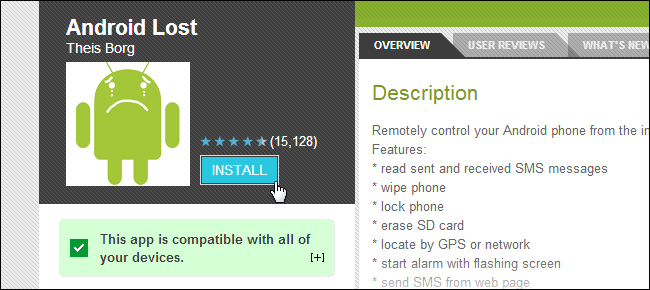
This is a more complicated way to track your phone. Basically, you need to install the tracking app ‘Android Lost’ on your phone and activate it by sending it an SMS (this can be done from any phone). How do you install something when you don’t have your phone with you? That’s very easy. You can install any app on all your registered devices directly from your browser through the Google Play website. Simply navigate to the Android Lost app and click the install button.
The remote installation process of Android Lost is very straightforward and only requires that your phone is still connected with your Google account. However, in case of theft, you have to hope that the thief doesn’t disconnect from your account.
So here’s what to do:
Step 1: Install Android Lost remotely
Install the Android Lost app remotely via Google Play in your browser and it will be installed on your phone remotely. As already mentioned, your phone still needs to be connected to your Google account. Otherwise, this won’t work.

Step 2: Activate Android Lost
If you are still in the possession of your smartphone or tablet then all you need to do is starting the app. But this is, obviously, probably not the case if you lost your phone. So, to register your device remotely, send an SMS with the text “androidlost register” to your phone. This SMS can be sent from any phone. This will trigger Android Lost to register itself using your Google account credentials.
If you own a tablet, SMS might not be an option. In that case, install “AndroidLost Jumpstart” before you install the actual Android Lost app. It will jump start the registration process when Android Lost is being installed.
Step 3: Log in to the Android Lost website
Visit the Android Lost website and sign in using your Google account. After doing that, you should have access to all remote control features such as the following:
- Read the latest SMS on your phone
- Force your phone to play a loud alarm with a flashing screen. Perfect if you misplaced your device.
- Get the location of your device
- Lock and unlock your phone
- Wipe your entire phone so no private data falls into the wrong hands
- Erase the SD card
- Use the camera to make pictures (front or rear camera) to get a nice shot of the nice person who took your device.
Note that it can take a while for the registration process to complete.
Android Lost is a great tool to get your phone back
I have to say that having the possibility to install and register this tool remotely makes it very powerful in case you lose your device. The only negative thing I experienced is that the notification of a new installed app called ‘Android Lost’ could tell a potential thief about what’s going on. Also, if enabled in your Play Store settings, an app shortcut will appear on the screen. The icon’s title is “Personal Notes” but after clicking on it, it gets clear what it’s about. Of course, you can disable this auto shortcut function in your Google Play app settings, but it’s hard to do so with the phone gone.
Here is a success story of a dad chasing down the man who stole his daughter’s phone with the help of Android Lost.
3. Plan B is the Android Lost alternative for devices running Android 2.0 – 2.3
If Android Lost is not working out for you and you’re phone is still running an older version of Android (2.0 up to 2.3) you could give Plan B from Lockout a try. Install the app directly from the Play Store (Link) to your device and, if successful, Plan B will send your device’s location to your Gmail address. It will send you a mail every 10 minutes with the current location. You can also use any other phone to send an SMS with “locate” to your phone to get the location via mail.
As already mentioned, Plan B only works with devices on Android 2.0-2.3, so it won’t work with most devices. Also, the app hasn’t been updated in a while, so I cannot guarantee that it will work.
4. How to use Dropbox to find your stolen phone (Android & iOS)
Dropbox can be your last resort if all other approaches don’t bring you any closer to finding your phone. For this to work, however, Dropbox needs to be installed on your phone and the “Camera Upload” feature has to be activated. This way, every time your phone’s thief takes a picture, it automatically gets uploaded to your Dropbox “Camera Uploads” folder. So, if he or she takes a nice selfie you might be able to identify the thief. And if you’re lucky, you can make out the location by looking at the background of the uploaded pictures.
So far, that’s the only way Dropbox can help you. Dropbox doesn’t give you the IP address of mobile devices which are connected to your Dropbox account. This is only possible for Desktop PCs and laptops until now.
I hope you are reading this just out of pure interest and not because you lost your phone! But if that’s really the case, I truly hope that this article will help you track it down. Either way, I recommend installing a good tracking app BEFORE your phone vanishes. An app I recommend is Cerberus, which is available on Google Play.
Have you been able to get back your mobile device after it got lost? How did you get it back?
Share your experience with us in the comments!
Free Internet Download Manager (IDM) Universal Crack Download 100% working
Posted by Nikhil Chawra 6/17/2014
Internet Download ManagerInternet Download Manager aka IDM developers release a new build of their well-known Download Accelerator ; Internet Download Manager regularly. So everybody who uses pirated versions get so pissed off that they have to find a new version of crack every time when an IDM update comes. So we made an awesome fix for that
An Universal Crack. You can activate any fucking version of IDM using this. Whenever IDM releases a new version.Just update it via IDM and press crack button.You are done ! You can simply trust on On HAX IDM crack because it has a history of more than 1 year with regular updates,and also it has more than 1,000,0000 worldwide downloads.
How to Crack any IDM Version ?
If you updated IDM using quick update, Uninstall your current IDM Installation completly
Then install IDM using the latest setup file from IDM Download Page (go to page)
Now follow the step below :-
- After that download and Run IDM Universal Activator
- Click Crack & Activate button and wait till a window appears
- Click Crack & Activate button there too and close the window
- Now Enter your First and Last names, Click Change Name
- Wait till it say that IDM activated successfully !
- Now open IDM and enjoy lifetime full version license
- How to Update / When a new version of IDM comes
Do not update IDM via IDM’s quick update ! Instead of that download the latest IDM setup from official IDM site and install it.Then run the Universal Activator again and Press the Crack & Activate > Crack button ! That’s all
Downloads & Links
Malware/Virus risk
Many virus guards say that this crack is a virus or some other kind of unwanted program. We can do nothing about that.All we can do is giving a guaranty that infototechno do not issue any crack or a program that can harm your computer or your privacy ( we really don’t got anything to do with your private data
But if you are still not mature enough to handle the risk, just purchase the full version of IDM from their purchase page !
Micromax Canvas Win W092 and Canvas Win W121 with Windows Phone 8.1 launched for Rs. 6500 and Rs. 9500
Posted by Nikhil Chawra 6/16/2014
Now, a drastic news for the micromax user, after grand success of micromax in android phones they put their first step toward windows phone.Hugh Jackman brand ambassador of Indian mobile phones has contributed micromax for this deal. Micromax has thrown everything to make it big. After being successful in the Android sphere, the company will now try to repeat the magic on Windows Phone starting with Canvas Win, the first Windows Phone series from the company.
Under the Canvas Win brand, Micromax will be selling two models, Canvas Win W092 and Canvas Win 121. The Micromax will sell windows supportable in cheaper as compared to microsoft, beating even the Lumia 520.

And surely, this is just the beginning. Microsoft announced the likes of Karbonn, Xolo, and Lava will also be producing WP devices. The manufacturers who made a name for themselves on the back of low-cost Android phones, now have their time in the sunshine, as Microsoft courts them.
Under the Canvas Win brand, Micromax will be selling two models, Canvas Win W092 and Canvas Win 121. The Micromax will sell windows supportable in cheaper as compared to microsoft, beating even the Lumia 520.
Micromax Canvas Win W092 Specifications
- 4-inch (800 x 480 pixels) capacitive touchscreen IPS display
- 1.2 GHz quad-core Qualcomm Snapdragon 200 processor
- Windows Phone 8.1 OS
- Dual SIM
- 5MP rear camera with LED Flash
- 0.3MP front-facing camera
- 3G, WiFi 802.11 b/g/n, Bluetooth, GPS
- 1GB RAM, 8GB internal memory, expandable memory with microSD
- 1500 mAh battery

- 4-inch (800 x 480 pixels) capacitive touchscreen IPS display
- 1.2 GHz quad-core Qualcomm Snapdragon 200 processor
- Windows Phone 8.1 OS
- Dual SIM
- 5MP rear camera with LED Flash
- 0.3MP front-facing camera
- 3G, WiFi 802.11 b/g/n, Bluetooth, GPS
- 1GB RAM, 8GB internal memory, expandable memory with microSD
- 1500 mAh battery
And surely, this is just the beginning. Microsoft announced the likes of Karbonn, Xolo, and Lava will also be producing WP devices. The manufacturers who made a name for themselves on the back of low-cost Android phones, now have their time in the sunshine, as Microsoft courts them.
Get Free 100 MB High speed 2G/3G Data in Tata Docomo
Posted by Nikhil Chawra 6/15/2014
Get Free 100 MB High speed 2G/3G Data in Tata Docomo
You just need to follow these easy steps :-
1. Just Dial *123*000#
2. You will see a message like Below:
" Hi! You have requested fit Reload pack with free 100 MB 2G data that is valid for 5 Days.Select 1 to activate or select 2 to go back to the main menu "
3. Select 1 to Activate.
4. You will Shortly Receive a Conformation Message. And your Pack will get activated.
5. Enjoy with your Free Internet Data.
Note :- In some cases this works only when your balance is below 5 Rs.
Enjoy free high speed internet.
Retain Your Mobile number while Switching between Cities [MOBILE PHONE PORTABILITY]
Posted by Nikhil Chawra 6/15/2014
A good news for the mobile users who are getting problem while switching between cities. Earlier, when someone switch from one city to another then he has to change his mobile number. But, now a interesting news from Delhi that we can retain our old mobile number while switching between cities. The technique behind it, is known as Mobile Phone portability.
In a move that will make mobile phone number portability (MNP) across the country a reality, an inter-ministerial panel approved a proposal that allows customers to retain their mobile numbers even after switching operator or location.
"The Telecom Commission has given in-principle approval to full MNP. Reference will be sent to TRAI for additional information and clarification," a government official said.
Currently, you have to pay roaming charges if you use your number outside your home city. Also, you will be billed on STD rates for the calls. A full MNP will help you do away with these charges as your new city becomes your home base without any change in the phone number.This is the news of relax for the outsiders, who have to switch between the cities.
"The Telecom Commission has given in-principle approval to full MNP. Reference will be sent to TRAI for additional information and clarification," a government official said.
Currently, you have to pay roaming charges if you use your number outside your home city. Also, you will be billed on STD rates for the calls. A full MNP will help you do away with these charges as your new city becomes your home base without any change in the phone number.This is the news of relax for the outsiders, who have to switch between the cities.
Narendra modi our new prime minister has recently approved this project. He put his first in the field of development. This news will be benificial not only for the customers but for the mobile companies too.
Full mobile number portability allows a user to retain number when he/she relocate to any part in the country. At present, the portability allows a user to switch to a different operator within the circle only while retaining the phone number.
Under National Telecom Policy (NTP) 2012, the government had envisaged implementing full MNP.Telecom regulator TRAI has asked DoT to give operators six months time from the date the full portability is approved for making suitable changes in their networks.
The move had seen subscribers shift from operator to another while retaining their number, after fulfilling some conditions. This gave people the freedom to easily shift from an operator in case he found his services unsatisfactory.
Once full MNP is in place, subscribers will have to dial numbers in the '+91' format — which is the standard dialling format — so that the calls get connected across the country without any trouble.
Under National Telecom Policy (NTP) 2012, the government had envisaged implementing full MNP.Telecom regulator TRAI has asked DoT to give operators six months time from the date the full portability is approved for making suitable changes in their networks.
The move had seen subscribers shift from operator to another while retaining their number, after fulfilling some conditions. This gave people the freedom to easily shift from an operator in case he found his services unsatisfactory.
Once full MNP is in place, subscribers will have to dial numbers in the '+91' format — which is the standard dialling format — so that the calls get connected across the country without any trouble.
12 Free Online Mobile Recharge & Earning Websites
Posted by Nikhil Chawra 6/14/2014
12 Free Online Mobile Recharge & Earning Websites
Mobile Recharge is one of the most popular and useful service that is done through internet worldwide. People from any country, any network can do instant mobile recharge by making payment via their online Bank Account, Credit Cards, Debit Cards, PayPal etc. From millions of websites, there are also few websites that lets you to do Free Mobile Recharge.
Here, we are showcasing those 100% genuine Free Online Mobile Recharge sites. These websites provides you recharge for inviting/referring friends, sending SMS, complete some easy tasks etc.
1. Facebook
Facebook is attracting more users from India by providing them free mobile recharge of Rs. 20/- on new sign-ups. Earlier, the gift was Rs. 50/- which will be credited to user’s mobile phone within 3 days.
I’ve explained it in 35+ Latest & Most Wanted Facebook Tricks. Read the article to know how to get free recharge from Facebook.
2. Way2SMS
From Way2SMS Referral Program, upon sign-up, you’ll get Rs. 2/- and by referring your friends on Facebook, GMail, you’ll earn Re. 1/-. You can earn by playing quizzes also.
Minimum recharge amount is Rs. 10/-.
3. ULtoo
Free SMS Site ULtoo also offer users to earn money and get mobile recharge. On its ‘Invite’ section, you’ll find unique referral URL. Each time your friend join ULtoo through your Referral Link, Re.1 will be credited to your account.
4. Laaptu
Laaptu, an entertainment website provides free mobile recharge at very ease. Joining bonus is Rs. 2/- and you can play a lot of games to earn more like, enter the guess section and earn 30 paise/guess. You can also participate in their unlimited referral program.
5. PICKZUP
Pickzup is one of the most popular and trusted website to get free mobile recharge. The website lets you earn credits for playing games, answering polls, reading emails etc. Upon each referral, you will get Rs. 3/-. Minimum recharge amount is Rs. 20/-
From their online cashback option you can get cashbacks in terms of free mobile recharge to shop other projects.
6. Amulyam
Amulyan is providing free mobile recharge to the users since 2009. There are lots of tasks like surveys, registration on other sites, etc. upon completion of which you’ll get credited. They also credit you on using their discount coupons for shopping sites.
You can recharge your mobile from your amulyam account once you accumulate minimum of Rs.10.
7. Kuizr
Kuizr is another competitive and popular site in this list. The site provides credit of Rs. 2/- per referral and when your referral user refer any other user then also you will get 30 paise upon each indirect referral.
You can also earn by sending Free SMS from the site, participating in quizzes.
8. PaisaLive
A genuine and very easy source of generating income online. It lets you earn just for opening (not even reading) emails.
From one of its referral program, you will get credited by Rs. 2/- for each referred sign-up.
9. YPox
YPox is also following the similar concept. You will get joining bonus of Rs. 2/- and to earn more, play quizzes, send SMS. You can also get your referral link and increase your earning multiple folds from their referral program.
10. LyfeTabs
LyfeTabs lets you remember life events like Birthdays, Anniversary and it lets you send Free SMS, MMS, Picture Emails etc. Earn 50 points as a sing-up bonus and upon each referral, you will earn 100 points that is equivalent to Rs. 10/- .
You can do mobile recharge as well as earn gifts.
11. FreeTalkie
Everyone can get free mobile recharge within 15 minutes by just participating in promotions from advertisers. After registration when you will login into your FreeTalkie’s account you will see lots of promotions for free recharge.
By participation in them you can made your first free mobile recharge within 15 minutes. Minimum recharge amount is Rs. 10/-
12. mGinger
The website lets you earn by completing various tasks like reading SMS, Emails, sending SMS. Upon each refer, you will earn Rs. 2/- and after reaching threshold amount, you can do mobile recharge for any mobile operator.
mobile recharge earning websites.online mobile recharge earning websites,best mobile recharge earning website,top 10 free mobile recharge and earning websites,Top free mobile recharge sites ,FREE MOBILE RECHARGES EARNING SITE
How To Call Any Number Using Any Other Number
Posted by Nikhil Chawra 6/14/2014
How To Call Any Number Using Any Other Number
Hello Readers, welcome Back To INFOTECHNO !! I know you all are excited after reading header of this post. Calling to other number using any number is also called as call spoofing but its not possible in all countries . Here we are going to show you one newly launched App which allows you to call other number using any number. As we all know most of the free calling app only allows us to call app to app calling that means if we want to call someone then he must use same app to receive our call. But here the situtaion is somehow similar but one extra feature is also added that you can call other numbers also which is not using same app.
DINGALING is the free calling app for Android or IOS devices and it got web interface also that means if you don't have Android or IOS device then also you can use these amazing features. It has the ability to make free calls to your friends mobile or landline numbers that means your friend need not have the app installed in his smartphone, just enter the phone number in dial pad of app and hit on free call.
There are TWO ways to use this free calling service : 1) Via Web Interface, 2) Via App To App.
1) Via Web-Interface : If you want to call any number using any number then just register to web interface by clicking Here . After sucessfull registration, just login and enjoy free call from Start new call section by putting From and To Numbers.
2) Via App To App or App To Other Numbers : If you have a Android app then you can use this application freely. You can call any number from your smartphone using this superb app. Main features of this app is that receiver will receive call from same registered number which you registered in dingaling, that means no one can caught you that you are calling him using any third party app.
Some Points To Be Remember :
- You can only use calling to any number using any number by using Web interface.
- Upto 10 mins calling allow to Indian numbers and upto 30 mins allowed for US, Canada & China numbers.
- You can send free sms only to Dingaling app users.
- Dingaling will show the number that you used during registration .
Hope I covered all steps to use this awesome free calling app. Comment below for more queries.
how to call anyone from any number, how to call any number from computer for free, anonymous call india,call from other people's number,call from other MOBILE's number,make call from other num
How To Change Your Facebook Profile Username After Limit
Posted by Nikhil Chawra 6/14/2014
![]() |
| change facebook username after limit |
Steps To Follow :
- Login Facebook.
- Now if you have any page with less than 200 likes then open it or create a new page if you don't have any page.
- Now goto page info of your page.
![]() |
| How To Change Your Facebook Profile Username After Limit |
- Now click on Edit Facebook Web Address.
- Now click on Change web address.
Note : If you create new page then you have to collect 25 likes first then only you can add username in your page.
![]() |
| How To Change Your Facebook Profile Username After Limit |
Now Here Comes The Tricky Part ........
- In web address, put your profile username and click on check availability.
- Now it will ask you to transfer your profile username, click on Transfer username.
- Now finally goto Account Settings section of your profile and click on change username.
- Done !! Now you can easily change your profile username.
Hope you loved this tricky way of changing Facebook username. Do comment for any type of queries.
Firefox OS Smartphone in August Intex to Launch Sub-Rs. 2,000 'Cloud FX'
Posted by Nikhil Chawra 6/13/2014
Mozilla has unveiled two Developer Preview smartphones that will act as a vanguard ahead of Firefox OS‘s consumer release later this year. The phones are being developed by Geeksphone — a Spanish smartphone start-up — and Telefonica, one of the largest telecommunications companies in the world (and also Spanish).
The first phone, dubbed the Keon (above right), is very much a budget smartphone. There’s a Snapdragon S1 SoC clocked at 1GHz (probably the newer, 45nm, Cortex-A5 variety), full support for the usual 3G and 2G bands, 4GB of storage, and 512MB of RAM. The display is a pokey 3.5-inch 480×320 unit, and there’s only a 3-megapixel rear shooter, but there is a micro SD slot, GPS, and 802.11n.
Soon after Mozilla's announcement that domestic handset manufacturers Intex and Spice were going to be launching Firefox OS-based smartphones in the 'next few months,' Intex and Spice have made statements to the same effect.
While Spice has only provided a July timeframe for the launch of its first Firefox OS smartphone, and said (via BGR) it would be a dual-SIM supporting device, Intex has listed some specifications of its first Firefox OS smartphone as well.
Intex in a statement on Thursday said its first Firefox OS smartphone, the Intex Cloud FX, would be priced under Rs. 2,000 when it launches in the first week of August. The company said the Cloud FX would sport a 3.5-inch display (resolution unspecified), and be powered by a 1GHz processor (number of cores unspecified).
Other features detailed by Intex for its Cloud FX smartphone running Firefox OS include a 2-megapixel rear camera, as well as Wi-Fi and Bluetooth connectivity. The specifications detailed by Intex are conspicuously similar to the reference $25 Firefox OS smartphone platform unveiled by Mozilla and Spreadtrum at MWC 2014.
The reference $25 (roughly Rs. 1,500) Firefox OS smartphone is based on the Spreadtrum SC6821 chipset, which supports 3.5-inch HVGA (320x480 pixels) touchscreens, integrated Wi-Fi and Bluetooth connectivity, FM radio and camera functions, and access to HTML 5 apps. We can expect the Intex Cloud FX to sport the same display resolution and connectivity features mentioned by Spreadtrum.
Commenting on the launch, Sanjay Kumar Kalirona, Business Head of the Mobile vertical at Intex, said, "Intex association with Mozilla Firefox is a step towards our brand's promise to offer quality products to our consumers to improve their lives and set industry benchmarks. Intex Cloud FX is aimed at fulfilling the idea of - 'Smartphone for all' which will be priced below Rs. 2,000. This smartphones will be equipped with enhanced phone and browser features of Firefox OS with an access to a rich ecosystem of latest web applications improving users overall smartphone experience at affordable prices"
Intex in its statement also added it is targeting sales of 3 million smartphones this year, after selling 1.5 million last year. So far, Spice has not provided more details about its unnamed Firefox OS smartphone that's due in July. We'll keep you updated as soon as we know more. What do you think of the sub-Rs. 2,000 Firefox OS smartphones due to hit the Indian market as soon as next month? Do they stand a chance against Android in the intensely competitive budget smartphone space? Let us know in the comments section below.
?
+
X
Recommended for you
Loading..