


7 Sites to Send SMS for Free without Registration
9/01/2012
.jpg) Most of us chat with our Friends using our Cell Phone and Many of us
used to send SMS online to our Friends and Family . For that we need to
Register in Some Site and always need to login into your account in
order to send a SMS. There are many sites to send Free SMS.
Most of us chat with our Friends using our Cell Phone and Many of us
used to send SMS online to our Friends and Family . For that we need to
Register in Some Site and always need to login into your account in
order to send a SMS. There are many sites to send Free SMS.Related Post - How to get Email Alert on your Mobile for Free
But what if there will be a site where you can send SMS to anyone without Registering or without telling your Number to the Receiver. I mean you do not need to Register yourself in Order to send an SMS . In other words the receiver will not be able to know your Number. Yes this is now Possible.
Previously I have posted about Send free SMS without Registration in 160 Character , but now I have a List of few Sites from whcih you can send SMS for Free without Registration in India .
Here we Go -
SMSTI.com
No Registration or Login required. Send Unlimited 160 Characters Sms. You Check Message Delivery Report in Real Time. They Don’t Include Any Ads Along With Your Sms. Very High Speed Message Delivery System.

BollywoodMotion
Send Upto 500Charecters SMS. All GSM and CDMA network Supported. No ads and Very High speed delivery.

SeaSMS
Here you can send SMS and MMS throughout the World for free without Registration.

SMSMAFIA
Free SMS India: Send free sms to all GSM CDMA mobiles from your computer without registration.
SMS PORTAL
Send Free SMS without registration
FooSMS
Write mobile number and message you want to send and click on send.

9TO9 SMS
So here were the List of the Top 7 SMS sites from where you can send SMS for Free without Registration.
Thanks
Trace Mobile numbers or IP-Address - How to?
8/29/2012
 Recently I came accross a website in which we can
easily trace a Mobile number. For example , when we enter the 10 digit
mobile number, then we get the Mobile Service provider, Location, City along with area. Thats really awesome.
Recently I came accross a website in which we can
easily trace a Mobile number. For example , when we enter the 10 digit
mobile number, then we get the Mobile Service provider, Location, City along with area. Thats really awesome.- This tool will be really helpful specially for business persons to verify the location etc...
- Just Enter your Ten Digit Mobile no. in the box shown below..and Click on Submit button

- After that the Information given by this website is Shown as below::

- Its really Awesome Website..Just Click Here to open this mind blowing website..
- Trace Vehical Number
- Trace Pin Code
- Trace IP Address
- WHOIS Trace
- Trace Fixed Line Number & More..
Hack Gmail using Advance Phishing Technique[UPDATED]
8/28/2012
.jpg)
It’s only for Educational purpose don’t misuse it because I will Not Hold any responsibility .
Step 1# First of all you’ll need Gmail verifying page as I earlier told you it is Advance Phishing attack to hack gmail, yahoo and lots more …!!
To make this page you need three file :i) Gmail Verifying Page ( out phishing page )
ii) mailer.php (this file work for redirect your phishing page )
iii) hackedid.txt ( leave this blank , it will store the passwords )
You can download this package from Here :
Step 2# After downloading the page, Open this package with WinRAR or any extractor tools that you are using , you need to edit this page .
So, Open Reauthenticate.htm or gmail.htmlThen find the email address “NCHAWRA6@GMAIL.COM“
And just replace it with the email address that you want to HACK …!!! As showed in image below

Step 3# Now you need website hosting to upload this file just go to
Don’t Panic !!! I am not going to ask you pay money for this, there are many websites available that provides free web hosting, we’ll be utilizing those free hosting here.
Out of all the best free hostings are:
www.ripway.com
www.t35.com
www.110mb.com
www.yourfreehosting.com
which support .PHP and ftp and than upload all files . Just open your Phishing page by right clicking on Reauthenticate.htm and copy this link …!!!
Step 4# Now in this steps you need some little bit of social engineering , just like chat with the Victim and give him your phishing page link as you copied earlier and tell him that, ” This link have many tutorial on Hacking”. When the Victim will Click on the link , Victim will see your phishing page. He will think that gmail is asking him to get verified because he saw that his email is already there and he just need to enter password to verify , and if he will put the password he will redirect to ( or according to your address as you edit in mailer.php ) and thus the Victim can’t even realize that he/she has been hacked.
See the Image:`
Now just go to hackedid.txt where you upload it …and BinGOO ….!!!! see below

If you have any problem regarding this tutorial or any other article, feel free to comment below !!!

TRACE VEHICLE AND GET ITS INFORMATION
8/28/2012
Hello Friends, today i am sharing an awesome trick with you all. Today I will tell you
How to trace a vehicle and get its information ?
This is very easy trick, it can be easily done only one thing u need is vehicle number of victim whom u want to trace.
first of all open the below link -----
 Enter the registration number of the vehicle which u want to trace and click on submit
 for more information click n show detail option and get the remaining info....................
ENJOY THE TRICK............................................
How to trace a vehicle and get its information ?
This is very easy trick, it can be easily done only one thing u need is vehicle number of victim whom u want to trace.
first of all open the below link -----


ENJOY THE TRICK............................................
Recover My Files 4.9.4 Full Version Portable PC Software
8/27/2012
If you are worry about the lost files now you can recover deleted files emptied from the recycle bin or deleted due to any type of virus attack or infection or due to formating your hard disk. You can use Recover My Files data recovery Software that can easily recover deleted files emptied from the Windows Recycle Bin, or lost due to the format or corruption of a hard drive, virus or Trojan infection, unexpected system shutdown or Software failure.

Download (link removed)
Few options are as under:
Download (link removed)
Few options are as under:
- Search Windows temporary folders
- Locate and recover files that have never been saved
- No technical skills required
- Recover My Files is fast and easy
- Hard drives
- USB drives
- External storage units
- Digital camera storage media
Windows 7 Tweaks free download
8/26/2012
Windows 7 Tweaks free download
Written by bestselling author and the creator of tweaks.com Steve Sinchak, this unique guide provides you with the ultimate collection of hidden gems that will enable you to get the most out of Windows 7. Packed with more than 400 pages of insider tips, the book delves beneath the surface to reveal little-known ways to tweak, modify, and customize Windows 7 so you can get every ounce of performance from your operating system.
Password Protect your USB with MyUsbOnly tool
8/20/2012
Sometimes we want to password protect or lock our computer’s USB Ports to restrict certain users to use the USB port for their purposes. This is very helpful to the people who have secret information in their system and want to hide it from the others.
 So if you also want to disable and password protect your USB drive
for certain or all USB drives then here is the free software for you
called MyUSBOnly.
So if you also want to disable and password protect your USB drive
for certain or all USB drives then here is the free software for you
called MyUSBOnly.Features of MyUSBOnly:
Password protect USB ports.
- Create a Device White list which allows access to certain USB Drives specified by you to access the system without any software (like your own drive).
- Block untrusted USB Drives.
- Run it invisibly and easily.
Download MyUSBOnly
FireFox: Lock Your Browser MenuBar With Password
8/20/2012
FireFox Menu Locker.
If you want to make privacy for your browser or want to lock menu bar with password you can use this extension its really fantastic plugin. you can lock it any time with a click just right click and choose last option it will be locked when you restart your browser.when you restart your browser till you will not enter passwords you will not able you to use menu bar Here is also a tutorial how you can do this, i given full details below also check more Extension for Firefox.How to:
- Get Your Extension Here just go there and Install the extension.
- After installation Restart your Browser and Right click on your browser and click on Lock Menubar.
- It will show you a message (your menubar will be locked when you next time open your browser)
- Restart your browser again and it will ask you password for when you click on menubar
Hope you like it if you really like feel free to share this.
Make IDM Full version without cracking 100% working
7/20/2012
Follow below steps .:

1. Make sure you have installed the latest version of IDM
from the official creators website.
2. Now after you have downloaded and installed the latest version
just close the IDM and now go to start menu and make a search for Notepad.
3. Now right click on Notepad and than Run It As Administrator.
4. Now navigate to .:
C: > Windows > System 32 > Drivers > etc. > Hosts.
5. When you are in the etc. folder you might not see any files their
as you have click on show all files on the right hand side below.
6. Now open the Hosts file With Notepad and paste all the below lines ,
Like I have Pasted In Below Image.
127.0.0.1 tonec.com
127.0.0.1 www.tonec.com
127.0.0.1 registeridm.com
127.0.0.1 www.registeridm.com
127.0.0.1 secure.registeridm.com
127.0.0.1 internetdownloadmanager.com
127.0.0.1 www.internetdownloadmanager.com
127.0.0.1 secure.internetdownloadmanager.com
127.0.0.1 mirror.internetdownloadmanager.com
127.0.0.1 mirror2.internetdownloadmanager.com

7. So now as you can see in the above image how
I have pasted all the lines @ the end of the Hosts file,
you have to do same as above, now hit save.
8. Now when you have saved the HOSTS File
you can simply enter any serials from below in your IDM Registration page
GRAB SERIALS FOR IDM
Internet Download Manager Serial Numbers .:
RLDGN-OV9WU-5W589-6VZH1
HUDWE-UO689-6D27B-YM28M
UK3DV-E0MNW-MLQYX-GENA1
398ND-QNAGY-CMMZU-ZPI39
GZLJY-X50S3-0S20D-NFRF9
W3J5U-8U66N-D0B9M-54SLM
EC0Q6-QN7UH-5S3JB-YZMEK
UVQW0-X54FE-QW35Q-SNZF5
FJJTJ-J0FLF-QCVBK-A287M
9. Now enjoy your full version IDM without purchasing or
patching it totally genuine and totally legal.
1. Make sure you have installed the latest version of IDM
from the official creators website.
2. Now after you have downloaded and installed the latest version
just close the IDM and now go to start menu and make a search for Notepad.
3. Now right click on Notepad and than Run It As Administrator.
4. Now navigate to .:
C: > Windows > System 32 > Drivers > etc. > Hosts.
5. When you are in the etc. folder you might not see any files their
as you have click on show all files on the right hand side below.
6. Now open the Hosts file With Notepad and paste all the below lines ,
Like I have Pasted In Below Image.
127.0.0.1 tonec.com
127.0.0.1 www.tonec.com
127.0.0.1 registeridm.com
127.0.0.1 www.registeridm.com
127.0.0.1 secure.registeridm.com
127.0.0.1 internetdownloadmanager.com
127.0.0.1 www.internetdownloadmanager.com
127.0.0.1 secure.internetdownloadmanager.com
127.0.0.1 mirror.internetdownloadmanager.com
127.0.0.1 mirror2.internetdownloadmanager.com

7. So now as you can see in the above image how
I have pasted all the lines @ the end of the Hosts file,
you have to do same as above, now hit save.
8. Now when you have saved the HOSTS File
you can simply enter any serials from below in your IDM Registration page
GRAB SERIALS FOR IDM
Internet Download Manager Serial Numbers .:
RLDGN-OV9WU-5W589-6VZH1
HUDWE-UO689-6D27B-YM28M
UK3DV-E0MNW-MLQYX-GENA1
398ND-QNAGY-CMMZU-ZPI39
GZLJY-X50S3-0S20D-NFRF9
W3J5U-8U66N-D0B9M-54SLM
EC0Q6-QN7UH-5S3JB-YZMEK
UVQW0-X54FE-QW35Q-SNZF5
FJJTJ-J0FLF-QCVBK-A287M
9. Now enjoy your full version IDM without purchasing or
patching it totally genuine and totally legal.
How to remove Babylon Search bar from firefox
7/16/2012
 For some strange and annoying reason, Bing is set to be the default
search provider for Firefox 4. Normally this wouldn’t be so bad –if
there were an easy way to change it (to Google). Additionally,
Firefox 4 has two input boxes at the top, the address bar and the search
bar. Both boxes are capable of performing searches, so it is just
wasted space having both. Now with version 12 out, for some this is
still the case. We covered how to customize the toolbar and get rid of the search bar
in our previous article. This time, we’ll look at how the more
complicated process of changing your default search provider for the
main address bar/box works.
For some strange and annoying reason, Bing is set to be the default
search provider for Firefox 4. Normally this wouldn’t be so bad –if
there were an easy way to change it (to Google). Additionally,
Firefox 4 has two input boxes at the top, the address bar and the search
bar. Both boxes are capable of performing searches, so it is just
wasted space having both. Now with version 12 out, for some this is
still the case. We covered how to customize the toolbar and get rid of the search bar
in our previous article. This time, we’ll look at how the more
complicated process of changing your default search provider for the
main address bar/box works.You may also read :-
SLOW PC ? Make your PC FASTER 100% WORKING
You may have noticed that the dedicated search box allows you to choose between providers. It also allows you to “Manage Search Engines…” But, unfortunately these changes only affect the search box, not the ‘Omnibar’esq Firefox 4 address box. You can even go as far as to remove all of the search engines from the list except for the one you want to use, but Firefox will still use the default (Bing) for any search terms typed into the main address bar. Let’s change that!
Step 1
Type about:config into the Firefox address bar. This will take you to the config warning page that says “This might void your warranty.” Take this warning label with a grain of salt, since Firefox doesn’t have a warranty. However, this is the advanced system settings area of Firefox, so don’t go messing around with stuff unless you’re a groovy expert.With that said, Click the “I’ll be careful, I promise!” button.

Step 2
In the Filter box, Type in keyword.URLUnder Preference Name, keyworld.URL should pop up. Right-Click it and Select Modify.
Step 3
The default URL is likely Bing, just erase it. Now all you need to do is Paste in the following URL that matches the search engine you would like the bar to use.Google Search: http://www.google.com/search?ie=UTF-8&oe=utf-8&q= Bing Search: http://www.bing.com/results.aspx?q= Yahoo! Search: http://search.yahoo.com/search?p=
Once entered, Click the OK button.
Done!
Changes should take effect immediately, to test it out open a new window (Ctrl+N) and type a search query into the address bar. If it performs a search on the search engine that you specified then you can close your about:config window and call it groovy. Now you’re using a search engine that you prefer, and you won’t be bothered by the default one.In my example, I changed my Firefox 4 default search provider to Google. Bing has it’s uses, but I find that it just doesn’t compare to Google in terms of speedy, relevant, search results.
How to remove watermark from an image or picture
7/16/2012
you may also read this :-
COMPRESS 1 GB OF DATA INTO 10 MB USING KGB ARCHIVER
There are several resources out there that teaches you how to remove watermark from pictures, but most of them are old. Although these guides are still relevant, in light of some new tools that has recently become available in our hands, I decided a new guide was necessary. Hence this tutorial.
Removing water mark using Photoshop CS5
The new iteration of Photoshop, Creative Suite 5 or CS5 in short, includes some handy tools that really helps in such tasks as removing watermarks. It’s called Content Aware Fill.For our example we will use an image from iStockPhoto and try to remove the watermark right across the face of the image.
Disclaimer: The use of materials from iStockphoto is for illustrative purposes only. We do not encourage stealing of copyrighted images from iStockphoto or from any other sources.

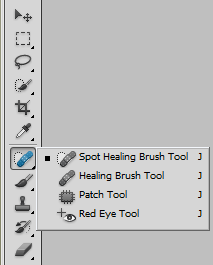
Open the image in Photoshop CS5, and select the “Spot Healing Brush Tool” from the toolbar. You can also press J to select it.
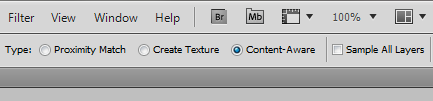
Select the option Content Aware Fill on the toolbar at the top.
Press [ or ] to increase or decrease the size of the brush as required, and carefully paint it over the watermark.

Release it, and the line is gone.

If the result is unsatisfactory, undo it or go back in History and repeat. Use the smallest brush size as possible to get good results.
For larger areas we will use the lasso tool. Select the watermark to remove using the Lasso Tool (L). Notice that I selected only a part of the watermark. This is because the image behind the watermark is not uniform. To get the best results work with small areas of the watermark. In this example, I left out the horn of the skull since it has a different texture.

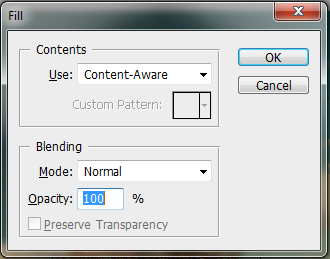
Now press D. Make sure “Content Aware” is selected under “Use” and press OK.
Remember, you can always undo and repeat the steps. Here is the final result with the complete watermark removed. Not perfect but passable.

Removing water mark using GIMP
GIMP too has a Content Aware Fill type feature which can be added to the software using plug-ins.Download the Resynthesizer plugin and copy the executable called resynthesizer.exe to gimp-2.0\lib\gimp\plug-ins\ directory.
Download this script (from Newslily) and copy it to
gimp-2.0\share\gimp\scripts\
Restart GIMP to reload the scripts.
Open the image on GIMP and using the lasso tool to select the watermark. Again notice that I’m doing this by selecting smaller chunks of area and not the entire logo.

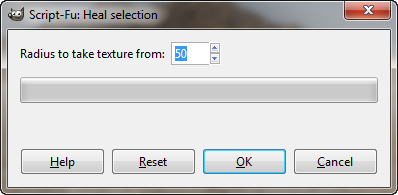
Now click on Filters>Enhance>Heal Selection.

Specify the radius to take the selection from. The default is 50 and should work fine. If it doesn’t, play around with the radius until you get the desired result. Once the heal is applied, the watermark should be gone.
Carry on with the rest of the image carefully selecting the areas to remove. This is the final result. Not bad, right?

How to Create Windows 7 Live CD/DVD/USB
7/16/2012
First, you will need the installation disk of Windows 7. Pop it into the optical drive and copy the contents to the hard drive.
Now download WinBuilder, unzip the contents and run the WinBuilder executable.

Select the project you want to download – Win7PE, in this case. From the dropdown menu at the top choose ‘Complete’. Click the ‘Download’ button to commence downloading of the necessary files, which should be about 35 MB.
After the download is completed, click on the Source tab and point the ‘Source Directory’ to the folder where you copied the installation files of Windows 7.

At this point, your live CD is ready to build. But you might want to customize it or add third party applications to the live CD, like we did in Windows XP live CD.
Adding Applications
To add applications to the CD, head to App Scripts page and search for the applications you wish to add. If you find them, you are in luck – somebody has already created it. Download the script, which should be a couple of hundred Kilobytes in size, and ending in the extension .script. Copy the script file to this directory:
\Projects\win7pe\Addons
The script doesn’t contain the actual application – it will be downloaded when the script is run and the program added to the CD. Under the ‘Addons’ folder you should see the application scripts you added. Depending on how the script was authored by the creator, you might get to customize the added application.
Creating your own application script is possible but is a laborious process. I haven’t even tried to learn
.
Customizing Appearance and Behavior
For customizing the appearance and behavior of the live CD, click on ‘Main Configuration’. Here you can adjust the screen resolution, choose a boot skin, boot manager and language.

To customize Windows Explorer button size and other behavior, expand the folder ‘Shell’ and click on Explorer shell. To change the desktop wallpaper, go into the ‘App’ folder. To customizing the boot screen, expand the ‘Finalize’ and click on the ‘Create ISO’ option.
Creating Bootable USB
If you wish to create a live USB instead of the live CD, expand the ‘Finalize’ folder and check the box
“Copy to USB device”
.
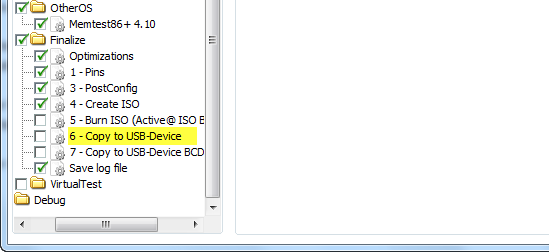
Finally, click the Play button to begin building the CD. This will take time. The final live CD will be only about 250 MB in size, but you will need at least 512 MB RAM to run the live CD.
Troubleshooting
It is possible you might run into some problems – I did. The script might fail to run and throw up some error message or the CD may refuse to boot. If that happens, you can go to the forums and ask about your specific problem. But there is an easier way out.
Download this pre-build package of scripts and applications that a WinBuilder user has created. It’s about 64 MB in size and comes with Opera Portable, 7-zip, DirectX, Microsoft Paint, Notepad, Wordpad and other useful programs. In addition, it enables you to apply more tweaks and customization like pin shortcuts to the taskbar and more.

After you have unzipped the contents of the downloaded package, fire WinBuilder and proceed from there. No additional download is necessary, unless you want to add more application. You can also uncheck any application you do not require.
DOWNLOAD ANDROID APPS ON PC WITH GOOGLE PLAY
7/07/2012
DOWNLOAD ANDROID APPS ON PC WITH GOOGLE PLAY

Android Market (Now, Google Play) has plenty of Applications both Paid and Free which add Fun and Simplicity to your Android experience. However, downloading Applications on Phone can be a real trouble, specially if you have a slow data connection.
There is no way provided by Google to download applications on the Computer. But, a simple trick can do the Job. You’ll be able to download Apps. from Google Play directly to your computer and then transfer to your phone. Just follow the following steps to do the job:
You need Chrome browser to do the trick. If you don’t already have it, download and install it from here.
- Open Chrome browser and install the APK Downloader Extension (Latest stable version is 1.2.1 which supports the new Google Play)
- Right click on the Google Chrome icon on your desktop and Choose Properties.
- Choose Shortcuts tab and add ‘ --ignore-certificate-errors --allow-running-insecure-content‘ at the end of Target box (without quotes) and click OK/Apply. Note that you need to leave a space after chrome.exe
- Close Chrome and Restart using the shortcut at the desktop.
- Open the Extension’s options page and fill up all the details. You will need the Device ID app. to find your Android device ID.
- Now, go to Google Play and further to the Application page of the App. you want to Download.
- Click the APK icon in your Address Bar to start downloading the application to your PC.


.jpg)
.jpg)

.jpg)


